Triton Backup
Now available for Windows

Professional backup,
finally done right

Triton is a modern desktop backup manager for Windows, powered by Restic. Encrypted, fast, automated — and built for people who take their data seriously.

Try Triton Free — 14 Days Buy a license

Closed Beta Currently in closed beta. Public release coming soon.

End-to-end encrypted
Automated schedules
S3, B2, SFTP & more
Snapshot browser
One-time purchase
Powered by Restic
AES-256 encryption at rest
Works with your existing Restic repos
Scheduled, unattended backups
Native Windows desktop app
Auto-updates included

Everything your backups need

A full-featured backup manager with no subscriptions and no compromise on capability.

End-to-end encryption

Every snapshot is encrypted with AES-256 before leaving your machine. Your repository password never leaves your device — not even to us.

Automated schedules

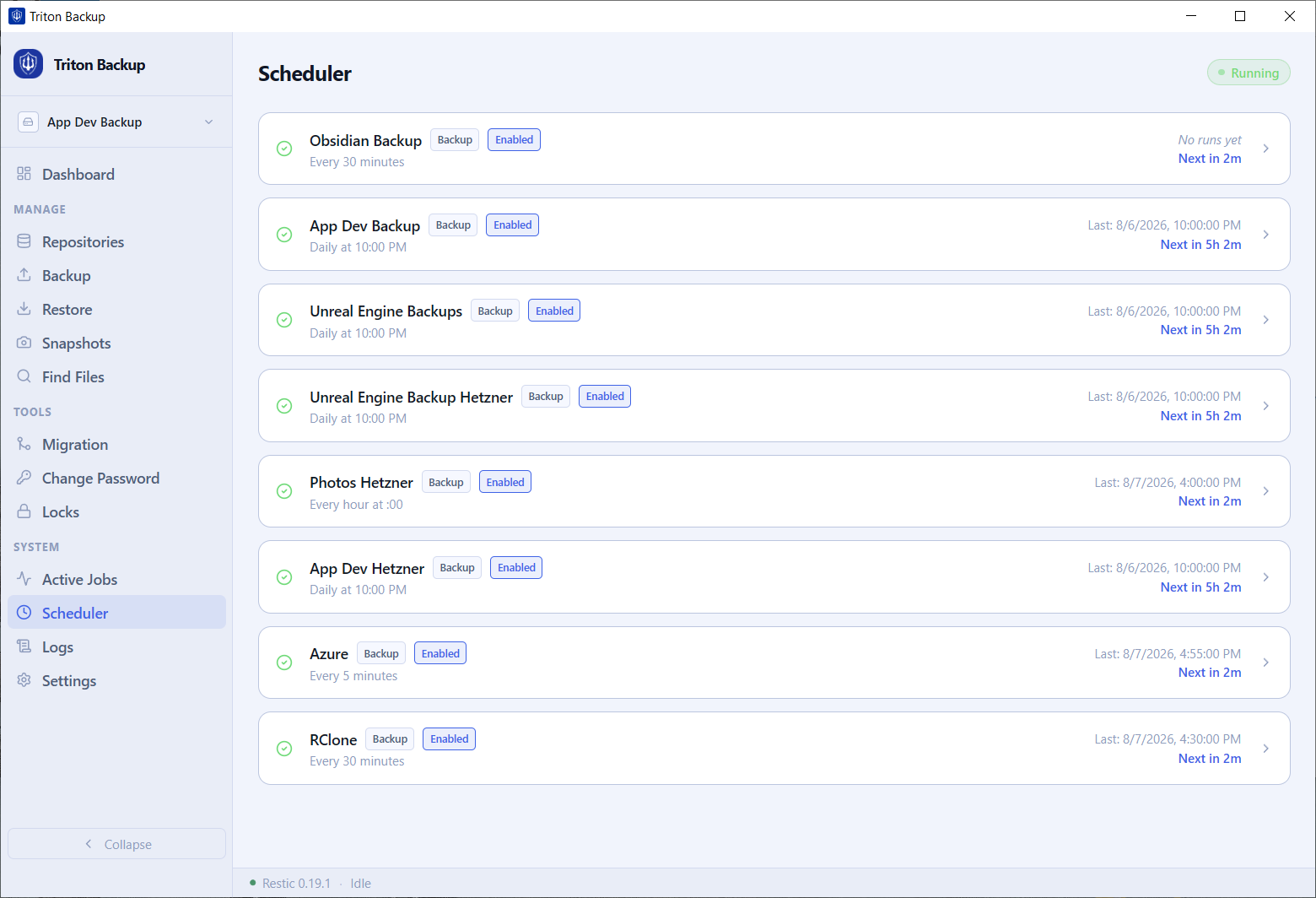
Set it and forget it. Configure backup, verify, and prune jobs on flexible cron schedules — daily, hourly, or whatever fits your workflow.

Multiple repositories

Manage as many backup destinations as you need. Each job is fully isolated with its own schedule, source paths, and credentials.

Snapshot browser & restore

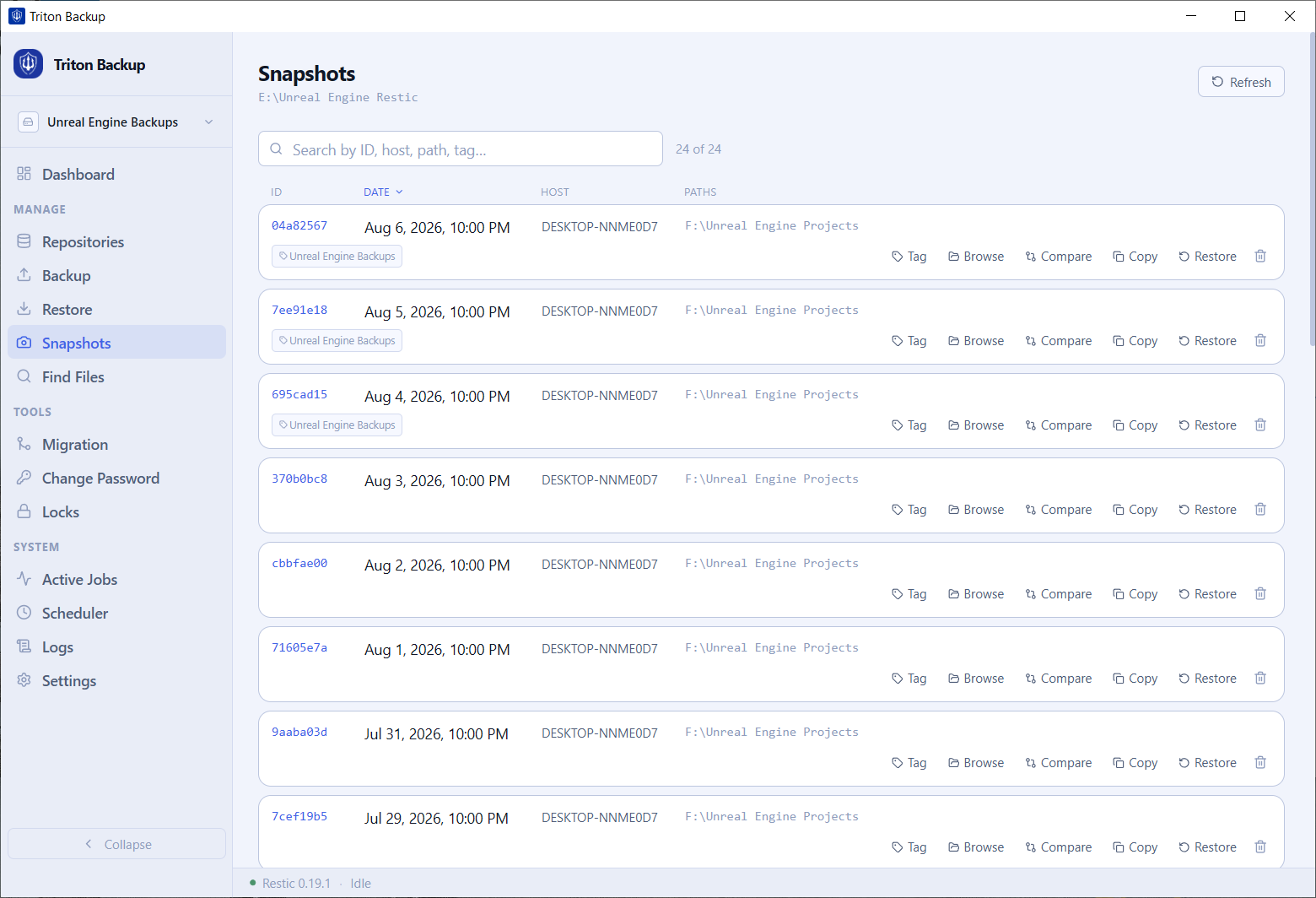
Browse all your snapshots by date. Restore your entire backup or cherry-pick individual files and folders back to any location.

Find files across snapshots

Search for any file across your entire backup history. Find exactly when a file existed and restore it from that point in time.

Active job monitoring

Watch backups in real time with live progress, data transfer speeds, and snapshot counts. Running jobs are always visible in the sidebar.

Full backup logs

Every backup, verify, and prune operation is logged. Review history by job, see what changed in each snapshot, and diagnose any issues.

Repository migration

Move snapshots between repositories without losing history. Useful when switching cloud providers or consolidating multiple backups.

Secure credential storage

Repository passwords and access keys are stored in the Windows Credential Manager — never in plain text on disk or in config files.

Powered by Restic — the world's most trusted backup engine

Triton is a desktop interface for Restic, the open-source backup program used by enterprises, sysadmins, and developers worldwide. You get the battle-tested reliability of Restic with the convenience of a native Windows application.

Deduplication

Only new data is transferred and stored. Backups are fast and your storage costs stay low.

Integrity verification

Every snapshot is checksummed. Run a verify job to confirm your backups are intact and restorable.

Compatible with existing repos

Already using Restic? Point Triton at your existing repository and manage it from day one.

No vendor lock-in

Your repository is a standard Restic repo. Use Triton, the CLI, or any other Restic-compatible tool — your data is always yours.

# Triton runs Restic under the hood

# Running backup...
restic backup C:\Users\you\Documents

repository a3f8c7d2 opened successfully
no parent snapshot found, will read all files

Files: 14,381 new, 0 changed, 0 unmodified
Dirs: 892 new, 0 changed, 0 unmodified
Added to the repository: 1.234 GiB

processed 14,381 files, 2.891 GiB in 0:28
snapshot e4d3a1b7 saved

# Verify integrity...
using 5 workers
no errors were found

Up and running in minutes

No complicated setup. Triton guides you through creating your first backup job step by step.

01

Create a repository

Choose where your backups will be stored — a cloud bucket, a remote server, or a local drive. Triton initializes the Restic repository and stores your credentials securely.

02

Add a backup job

Pick the folders you want to protect. Optionally define exclude patterns to skip temp files, caches, or anything else you don't need.

03

Set your schedule

Choose when backups run — daily at midnight, every hour, or a custom cron expression. Triton handles everything in the background while you work.

04

Restore when you need to

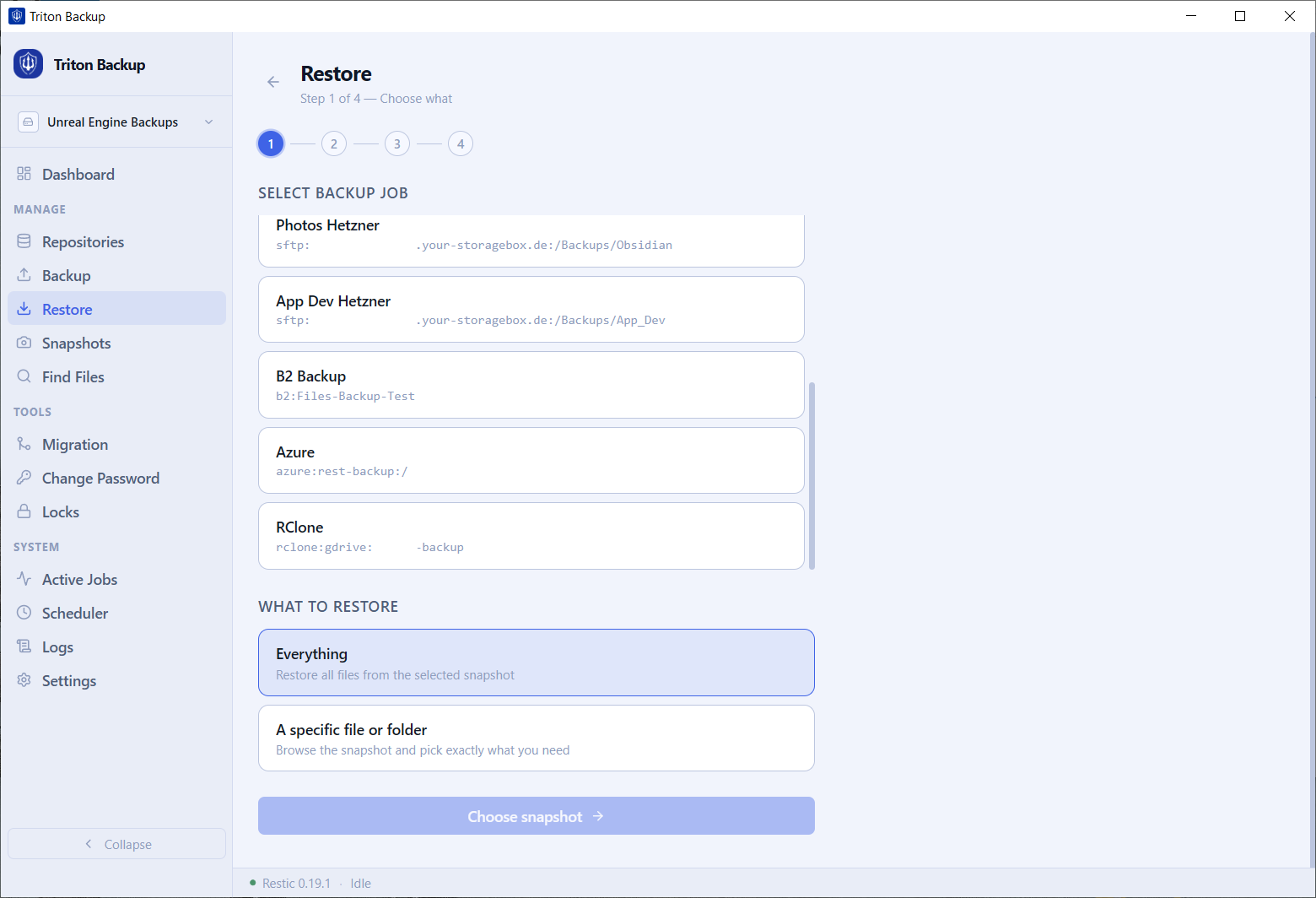
Browse your snapshot history, search for any file, and restore it to its original location or somewhere new — in just a few clicks.

See it in action

A clean, modern interface that puts your backup data front and center.

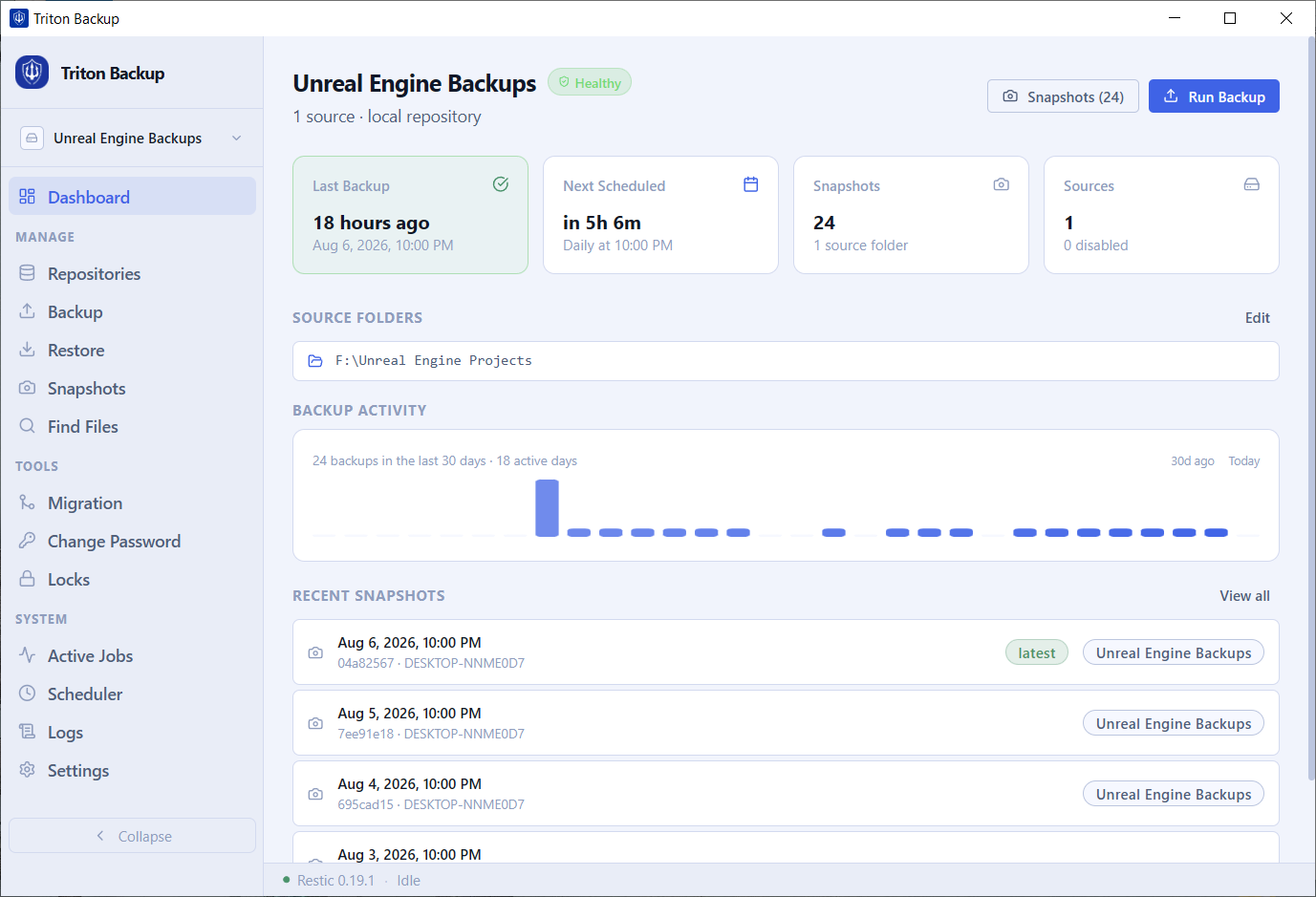
Triton Backup — Dashboard view showing backup health, activity chart, and recent snapshots
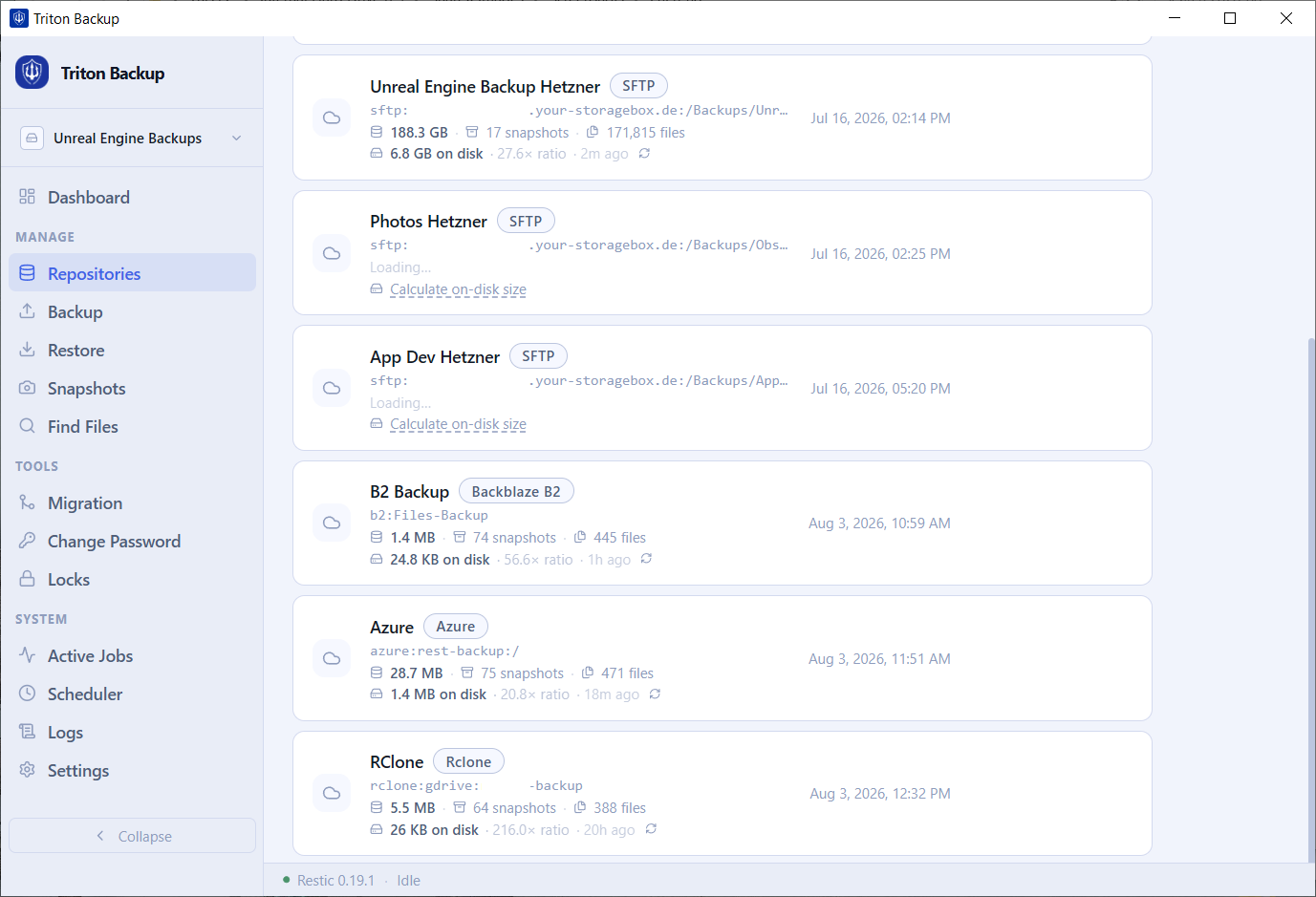
Triton Backup — Repositories list with SFTP, Backblaze B2, Azure, and Rclone backends
Triton Backup — Scheduler showing multiple backup jobs with next run times
Triton Backup — Snapshots list with browse, compare, copy and restore actions
Triton Backup — Restore wizard step 1, selecting backup job and restore scope

Dashboard — backup health, activity chart, and recent snapshots at a glance

Back up to anywhere

Triton works with every storage backend that Restic supports — cloud, self-hosted, or local.

🪣
Amazon S3
Any S3-compatible
🔥
Backblaze B2
Cost-effective cloud
☁️
Wasabi
S3-compatible
🌐
Cloudflare R2
S3-compatible
🔑
SFTP
SSH-based servers
🖥️
REST Server
Restic REST backend
💾
Local / NAS
Any local drive or UNC path
🔷
Azure Blob
Microsoft Azure

If Restic supports it, Triton supports it.

One-time purchase. No subscription.

No monthly fees. No renewals. Buy Triton once and keep using it.

Personal
€39.90
one-time · inc. VAT
  • 1 machine
  • All features included
  • Free updates for Triton
  • Email support

Available at public launch

Business
€219.90
one-time · inc. VAT
  • Up to 10 machines
  • All features included
  • Free updates for Triton
  • Email support

Available at public launch

All plans include the complete Triton experience. Choose based on the number of machines you need.

Buy once. Keep your license forever.

No subscriptions. No forced upgrades. Your license stays yours.

Frequently asked questions

Restic is an open-source backup program with a strong track record — it's used by developers, sysadmins, and enterprises around the world. It handles encryption, deduplication, and repository integrity. Triton provides the graphical interface so you get all of Restic's power without needing to use the command line.
When you first launch Triton, it starts a 14-day free trial with full access to every feature. No credit card is required. When the trial ends, you can purchase a license to continue using the app. Your repositories and snapshots are never affected — everything you backed up during the trial remains fully accessible.
No. Your backup data goes directly from your machine to the storage destination you configured (S3, B2, SFTP, etc.). Triton never sees or touches your files. The only data that reaches our servers is your email address and a machine identifier for license verification.
Yes. Triton works with any existing Restic repository. Just add the repository in the app, enter your password, and Triton will show you all your existing snapshots. No migration or re-backup needed.
All sensitive credentials — repository passwords and cloud storage access keys — are encrypted using Windows DPAPI (Data Protection API) and stored on disk. Encryption is tied to your Windows user account, so the data is unreadable on any other machine or account. They are never stored in plain text.
Yes — your license includes all future updates to Triton at no extra cost. When a new version is available, the app will notify you and install the update automatically.
Go to Settings → License in Triton and click Deactivate. This removes the license from your current machine and frees up the slot. You can then activate Triton on your new machine using the same license key. A 72-hour cooldown applies between deactivations.
Triton currently supports Windows 10 and Windows 11. macOS and Linux versions are on our roadmap.

Your data deserves a reliable backup

Start your 14-day free trial today. No credit card required.

Get Triton — starting at €39.90

Privacy Policy

Last updated: August 2026

1. Who we are

Triton Backup is a desktop software product. For any questions, contact us at support@tritonbackup.io.

2. Information we collect

3. How we use your information

4. Data sharing

We do not sell or share your personal data with third parties, except as necessary to process payments (Paddle).

5. Data retention

License data is retained for as long as your license is active. You may request deletion by contacting support@tritonbackup.io.

6. Your rights

You have the right to access, correct, or delete your personal data. Contact us at support@tritonbackup.io to exercise these rights.

7. Cookies

This website does not use tracking cookies or analytics.

8. Contact

For any privacy-related questions: support@tritonbackup.io